
Organize thoughts into daily and weekly plans

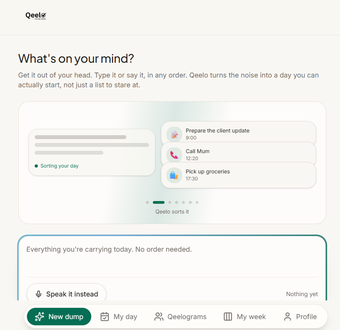
Qeelo is a free productivity app that turns scattered thoughts into an organized plan for the day. You can type or speak what is on your mind, then sort those thoughts into daily and weekly plans. With reminders, voice input, and shared planning, it works as a flexible planner for managing tasks.

Brain dumping made productive

You often start your day with a jumbled mental list of tasks, and Qeelo gives you somewhere to dump those thoughts before sorting them out. You can type or say what needs doing, then use My Day or My Week to see those tasks in a more usable plan.

Once the tasks are in place, you can set reminders for things that need attention later. The voice option is handy when typing feels inconvenient. Meanwhile, Qeelogram gives you a shared space for plans involving other people. One limitation, though, is that the app doesn’t offer external calendar syncing or native system-level push notifications, which might limit its utility. 

Flexible daily planner

For anyone who tends to keep too many tasks in their head, Qeelo offers a practical way to get them into a plan without relying only on a traditional to-do list. The mix of daily and weekly planning, reminders, voice input, and shared spaces gives it a useful range, though the lack of external calendar syncing and system-level push notifications is worth keeping in mind.

  • Pros

    • Daily and weekly task planning
    • Voice input for adding tasks
    • Reminders for tasks that need attention
    • Shared planning with Qeelogram
  • Cons

    • No external calendar syncing
    • No native system-level push notifications
 0/1

App specs

  • Developer

  • License

    Free

  • Version

    1.0

  • Latest update

  • Platform

    Web Apps

  • OS

    Chrome

  • Language

    English

Program available in other languages


User reviews about Qeelo

Have you tried Qeelo? Be the first to leave your opinion!

Add review

Latest articles

Laws concerning the use of this software vary from country to country. We do not encourage or condone the use of this program if it is in violation of these laws.
Softonic

Is Qeelo safe?

100/100

Score result: Clean

This file passed a comprehensive security scan using VirusTotal technology. It is safe to download.

  • Virus free
  • Spyware free
  • Malware free
  • Verified by Security Partners

    VirusTotal logo

Scan Info

Last scan
Wednesday, September 16, 2026
Scan provider
VirusTotal

Softonic security commitment

Qeelo has been thoroughly scanned by our advanced security systems and verified by industry-leading partners. This file comes from the official developer and has passed all our security checks, showing no signs of viruses, malware, or spyware. For more information, visit our Security and Trust Center

Signed in to Softonic as